회원가입 화면 구현
회원가입&로그인 페이지는 현재 final project에서 사용할 템플릿에는 페이지가 없어서 따로 다른 템플릿을 가져와 조금 수정을 해주었고,
프론트 작업으로 유효성 검사를 진행하였다
--> 아이디, 비밀번호, 이름, 휴대전화번호
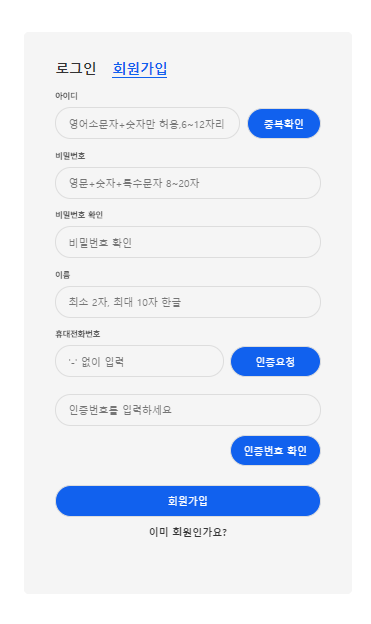
<!--회원가입 시작-->
<div class="sign-up-htm">
    <form th:action="@{/signUp}" th:object="${memberDTO}" method="POST" id="signUpForm">
        <!-- 회원가입 폼 -->
        <div class="group">
            <label for="signUpId" class="label">아이디</label>
            <div class="id-group">
                <input id="signUpId" type="text" class="input signUpId-input" th:field="*{userId}"
                       placeholder="영어소문자+숫자만 허용,6~12자리" required>
                <button type="button" class="button idCheck-bnt" onclick="idCheck()">중복확인
                </button>
            </div>
            <span id="idMsg" class="validate"></span>
        </div>

        <div class="group">
            <label for="signUpPwd" class="label">비밀번호</label>
            <input id="signUpPwd" type="password" class="input" th:field="*{userPwd}"
                   onkeyup="validatePassword()" placeholder="영문+숫자+특수문자 8~20자" required>
            <span id="pwdMsg" class="validate"></span>
        </div>
        <div class="group">
            <label for="confirmPassword" class="label">비밀번호 확인</label>
            <input id="confirmPassword" type="password" class="input" th:field="*{confirmPassword}"
                   onkeyup="validatePassword()" placeholder="비밀번호 확인">
            <span id="pwdConfirmMsg" class="validate"></span>
        </div>

        <div class="group">
            <label for="signUpName" class="label">이름</label>
            <input id="signUpName" type="text" class="input" th:field="*{userName}"
                   onkeyup="validName()" placeholder="최소 2자, 최대 10자 한글" required>
            <span id="nameMsg" class="validate"></span>
        </div>

        <!--휴대전화번호 입력-->
        <div class="group">
            <label for="phone" class="label">휴대전화번호</label>
            <div class="phone-group">
                <input id="phone" type="text" class="input phone-input" th:field="*{userPhone}"
                       placeholder="'-' 없이 입력" required>
                <button type="button" class="button requestSMS-bnt"
                        onclick="requestSMS()">인증요청
                </button>
            </div>
            <span id="phoneMsg" class="validate"></span>
            <!--인증번호 입력-->
            <div class="group">
                <label for="Authentication" class="label"></label>
                <input id="Authentication" type="text" class="input" placeholder="인증번호를 입력하세요" required>
                <!--서버에서 발송된 인증번호-->
                <input type="hidden" id="randomNum" value="">
                <button type="button" class="button checkSMS-bnt"
                        onclick="checkSMS()">인증번호 확인
                </button>
                <span id="authMsg" class="validate"></span>
            </div>

        </div>
        <div class="group">
            <button type="submit" class="button signUpBnt" >회원가입</button>
        </div>
    </form>

    <!--로그인 화면 이동-->
    <div class="foot-lnk">
        <label for="tab-1">
            <a>이미 회원인가요?</a>
        </label>
    </div>
</div>
<!--회원가입 끝-->html 코드 작업을 할때,
placeholder로 입력 필드에 사용자가 아무런 값을 입력하지 않았을 때도 올바른 값을 입력할 수 있도록 추가해 주었고
required로 필수 입력 필드를 지정하여 값을 입력하지 않으면 폼을 제출할 수 없게 해주었다.
프론트 유효성 검사
또 아래와 같이 JavaScript로 onkeyup,onclick과 같은 이벤트 속성을 통하여 추가적인 검증을 했다.
// 회원가입 유효성 검사
// 인증 완료 여부를 저장하는 변수
let isVerified = false;
// 유효성 검사 결과 저장 변수
let isNameValid = false;
let isPwdValid = false;
let isIdValid = false;


// 아이디 중복체크
function idCheck() {
    const signUpId = document.getElementById("signUpId").value;
    const idMsg = document.getElementById("idMsg");

    // 영문 소문자와 숫자만 허용, 6자리 이상 12자리 이하
    const idPattern = /^(?=.*[a-z])[a-z0-9]{6,12}$/;

    // 아이디 입력란이 비어있는지 확인
    if (!signUpId) {
        alert('아이디를 입력해 주세요.');
        return; // 아이디가 없으면 함수를 종료
    }

    // 유효성 검사
    if (!idPattern.test(signUpId)) {
        idMsg.innerHTML = "영어 소문자 + 숫자 6~12자리로 입력하세요.";
        idMsg.style.color = "red";
        isIdValid = false;
        return;
    }

    console.log(signUpId);
    console.log("Checking ID");

    // AJAX를 통해 중복 체크
    $.ajax({
        type: "POST",
        url: "/idCheck",
        data: JSON.stringify({ userId: signUpId }), // JSON 형식으로 데이터를 전송
        contentType: "application/json", // 서버가 JSON 형식을 인식하도록 지정
        success: function(response) {
            console.log(response);
            if (response.result > 0) {
                alert('이미 사용 중인 아이디입니다.');
                idMsg.innerHTML = "아이디가 이미 사용 중입니다.";
                idMsg.style.color = "red";
                isIdValid = false;
            } else {
                alert('사용 가능한 아이디입니다.');
                idMsg.innerHTML = "사용 가능한 아이디입니다.";
                idMsg.style.color = "#aaa";
                isIdValid = true;
            }
        },
        error: function(err) {
            console.error('AJAX 요청 실패:', err);
            idMsg.textContent = '서버 오류가 발생했습니다. 나중에 다시 시도해 주세요.';
            idMsg.style.color = "red";
            isIdValid = false;
        }
    });
}

// 이름 유효성 검사
function validName() {
    const signUpName = document.getElementById("signUpName").value;
    const nameMsg = document.getElementById("nameMsg");

    const idPattern = /^[가-힣]{2,10}$/; /*최소 2자, 최대 10자의 한글만 가능합니다*/

    if(idPattern.test(signUpName)) {
        nameMsg.innerHTML = "사용 가능합니다."
        nameMsg.style.color = "#aaa";
        isNameValid = true;
    }
    else {
        nameMsg.innerHTML = "한글만 가능 합니다."
        nameMsg.style.color = "red";
        isNameValid = false;
    }
}

// 비밀번호 유효성 검사
function validatePassword() {
    const signUpPwd = document.getElementById("signUpPwd").value;
    const confirmPassword = document.getElementById("confirmPassword").value;
    const pwdMsg = document.getElementById("pwdMsg");
    const pwdConfirmMsg = document.getElementById("pwdConfirmMsg");

    const pwdPattern = /^(?=.*[A-Za-z])(?=.*\d)(?=.*[@$!%*#?&])[A-Za-z\d@$!%*#?&]{8,20}$/;


    if (pwdPattern.test(signUpPwd)) {
        pwdMsg.innerHTML = "유효한 비밀번호입니다.";
        pwdMsg.style.color = "#aaa";
        isPwdValid = true;
    } else {
        pwdMsg.innerHTML = "영문+숫자+특수문자를 포함하여 8~20자로 입력하세요.";
        pwdMsg.style.color = "red";
        isPwdValid = false;
    }

    // 비밀번호 확인 일치 검사
    if (signUpPwd !== "" && signUpPwd === confirmPassword) {
        pwdConfirmMsg.innerHTML = "비밀번호가 일치합니다.";
        pwdConfirmMsg.style.color = "#aaa";
    } else if (confirmPassword !== "") {
        pwdConfirmMsg.innerHTML = "비밀번호가 일치하지 않습니다.";
        pwdConfirmMsg.style.color = "red";
    } else {
        pwdConfirmMsg.innerHTML = "";
    }
}


// 타이머 함수 추가
let timer;
let timeLeft = 1200; // 3분 (180초)

function startTimer() {
    clearInterval(timer); // 이전 타이머가 있다면 초기화
    timeLeft = 1200; // 시간 초기화

    const authMsg = document.getElementById("authMsg");
    const authInput = document.getElementById("Authentication");
    authInput.disabled = false; // 인증번호 입력란 활성화

    timer = setInterval(function() {
        if (timeLeft <= 0) {
            clearInterval(timer); // 타이머 종료
            alert("인증시간이 초과되었습니다. 다시 시도해주세요.");
            authInput.disabled = true; // 인증번호 입력란 비활성화
        } else {
            authMsg.innerHTML = `제한 시간: ${timeLeft}초`;
            authMsg.style.color = "#aaa";
        }
        timeLeft--;
    }, 1000); // 1초마다 실행
}

// 휴대전화 인증
// 인증번호 전송 요청
function requestSMS() {
    const phone = document.getElementById("phone").value; // 사용자 입력 휴대전화 번호
    const phoneMsg = document.getElementById("phoneMsg"); // 휴대전화 번호 유효성 메시지
    // 휴대전화 번호 정규식: 010으로 시작하며, 뒤에 8자리 숫자가 나옴
    const phonePattern = /^010\d{8}$/;

    if (!phone) {
        alert('휴대전화 번호를 입력해 주세요.');
        return;
    }
    // 휴대전화 번호 유효성 검사
    if (!phonePattern.test(phone)) {
        phoneMsg.innerHTML = "유효한 휴대전화 번호를 입력해 주세요.";
        phoneMsg.style.color = "red";
        return;
    }

    $.ajax({
        type: "POST",
        url: "/sms/send",
        contentType: "application/json",
        data: JSON.stringify({ phoneNumber: phone }), // controller로 보낼 데이터 JSON 형태로 변환
        success: function(response) {
            console.log("SMS response:", response); // 응답 로그 추가
            alert("인증번호가 발송되었습니다.");
            document.getElementById("randomNum").value = response.certificationCode; // 인증번호를 hidden input에 저장
            startTimer(); // 인증번호 제한시간 시작
        },
        error: function(xhr, status, error) {
            alert("인증번호 발송에 실패했습니다. 다시 시도해주세요.");
        }
    });
}


// 인증번호 확인
function checkSMS() {
    const userCode = document.getElementById("Authentication").value; // 사용자가 입력한 인증번호
    const serverCode = document.getElementById("randomNum").value;

    console.log("사용자 입력 인증번호:", userCode);
    console.log("서버에서 받은 인증번호:", serverCode);

    if (!userCode) {
        alert('인증번호를 입력해 주세요.');
        return;
    }

    if (userCode === serverCode) {
        clearInterval(timer); // 타이머 중지
        isVerified = true;
        document.getElementById("authMsg").innerHTML = "인증이 정상적으로 완료되었습니다.";
        document.getElementById("authMsg").style.color = "#aaa";
    } else {
        alert("인증번호가 올바르지 않습니다.");
        isVerified = false;
    }
}

// 폼 제출 시 호출되는 함수
function validateForm(event) {
    if (!isIdValid || !isPwdValid || !isNameValid || !isVerified) { // 하나라도 false가 있으면 폼 제출 막음
        alert("올바르게 기입하였는지 확인해주세요.");
        event.preventDefault(); // 폼 제출을 막습니다
    }
    else {
         // 모든 검사가 통과되었을 때 회원가입 성공 메시지
         alert("회원가입에 성공하였습니다.");
         }
}

// 폼 요소에 이벤트 리스너 추가
document.addEventListener('DOMContentLoaded', () => {
    const form = document.getElementById('signUpForm'); // 폼 선택
    form.addEventListener('submit', validateForm); // submit 이벤트 리스너 추가
});JavaScript 코드에 추가적으로 전역변수를 선언해 인증 완료 여부와 유효성 검사 결과를 저장한 후 올바르게 기입되지 않은 경우 폼제출을 차단 하게 하였다
또한 ajax를 활용하여 서버와 비동기적으로 연결하여 검사를 수행했다
-> 아이디 중복검사: 사용자가 입력한 아이디의 유효성을 프론트에서 먼저 검사한 후, ajax를 통해 서버로 요청을 보내 아이디의 중복 여부를 확인, 서버에서 반환된 응답에 따라 사용자에게 사용 가능한지 체크
->인증번호 검사 : 사용자에게 인증번호를 발송한 후, 인증번호를 입력할 때마다 ajax를 통해 서버와 연결해 입력된 인증번호가 유효한지 검증
서버에서 회원가입을 위해 처리하는 코드는 다음 블로그에서 작성하도록 하겠다!